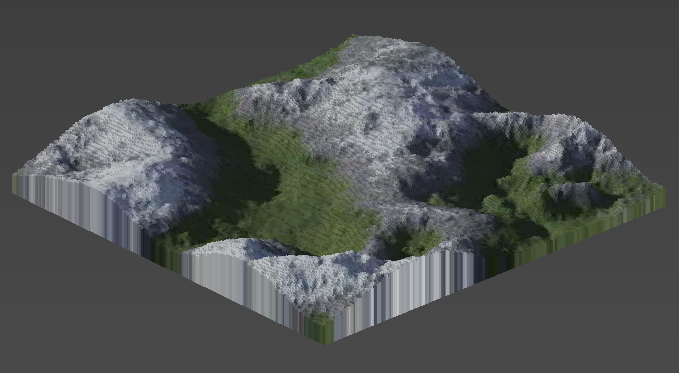
Appearance
Import Heightmap
Import a heightmap and an optional texture to create a terrain.
Overview
Heightmaps can be generated with terrain generators like the freeware tool Terragen. But you can use basically any image to get some interesting results.
The heightmap is typically a black and white image. This image tells the algorithm how high a certain part of the landscape is. The brighter a pixel, the higher the terrain is at that point. By setting a max height you tell the algorithm how high a voxel will be if a pixel is pure white.
Qubicle allows you to pick a second image that needs to be the same size as the heightmap. That image will be mapped on top of the generated terrain as a texture.
How to Import a Heightmap
- Choose
File > Import Heightmap - Adjust import options
Import Options
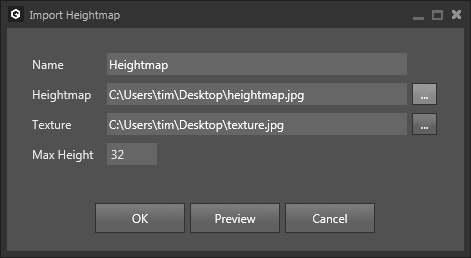
| Option | Description |
|---|---|
Name | Sets the name of the resulting matrix. |
Heightmap | Sets the image used as heightmap. |
Texture | (optional) Sets the image used as texture. |
Max Height | Sets the height of the resulting matrix and the elevation used for a white pixel of the heightmap. |
Example
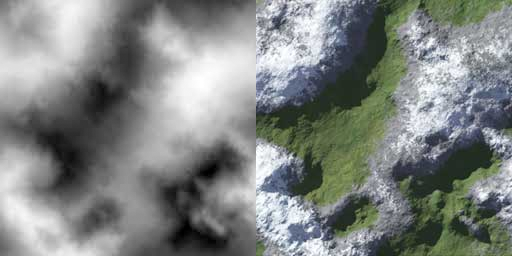
Using the two images above as heightmap/texture and a max height of 32 will output the following terrain: